Governance, quality & risk in one cloud workspace

One governance.
One hub.

Stop chasing work across email, spreadsheets and shared folders. GOV one Hub brings tickets with SLAs, controlled documents, change control, compliance, internal audits and enterprise risk into one modern, audit-ready system your whole organisation will actually use.

  • Live in days, not months
  • No software to install
  • E-signatures and a tamper-evident audit trail
govonehub.com / Risk dashboard
GOV one Hub risk dashboard showing the heatmap, risks by company and by department
Approved & e-signed
Policy v2.0 · just now
Task delegated
Finance manager → team

Everything a governance office runs, in one place

  • SLA tickets
  • Controlled documents
  • Change control
  • Compliance & CAPA
  • Internal audits
  • Enterprise risk
  • Live dashboards
Why GOV one Hub

Governance shouldn't live in twelve different places

When requests, policies, audits and risks are scattered, nothing is provable, deadlines slip and every audit becomes a scramble. GOV one Hub replaces the patchwork with one system of record.

Without a single system

  • Requests buried in inboxes, no clock, no owner
  • Policies in shared folders: which version is current?
  • Approvals by email, with no proof of who agreed to what
  • Audit findings and follow-ups tracked in spreadsheets
  • Risks in a file nobody reviews until something goes wrong

With GOV one Hub

  • Every request has an owner, an SLA clock and a full history
  • One registry of numbered, versioned, effective documents
  • Electronic signatures that record who, what and when
  • Findings, actions and follow-ups that assign themselves to the right managers
  • A live risk register with scoring, controls and reviews
The platform

Six modules. One login. One truth.

Start with what hurts most and switch on the rest when you are ready. Everything shares the same people, departments, companies, tasks and audit trail.

Tickets & SLA

Turn every request into tracked work with a clock that pauses when it should.

  • Drag-and-drop board and queue
  • SLA with pause rules and breach alerts
  • Reopened tickets keep their failed resolutions
  • Satisfaction surveys on closure

Controlled documents

Numbered, versioned, approved and acknowledged, so people always read the current version.

  • Request, review and approve with comments
  • Minor and major versions
  • Read & understood by role, team or person
  • Periodic review reminders

Change control

Assess impact, collect signed approvals and prove the change worked.

  • Impact assessment and task plan
  • Every approver signs, one rejection stops it
  • Effectiveness check before closure
  • Linked to documents and tickets

Compliance & CAPA

Investigate, find the root cause and close the loop with corrective and preventive actions.

  • Cases with owners and follow-up dates
  • CAPA actions with due dates
  • Cannot close with open actions
  • Effectiveness verification

Internal audits

Plan audits on a calendar, record findings and drive every action to verified closure.

  • Per-department numbering and calendar view
  • Findings with SLA and attachments
  • Actions assigned to department managers
  • Managers delegate inside their team

Enterprise risk

Identify, score, treat and review risks, and see exposure by department and company.

  • 5×5 heatmap, appetite and escalation
  • Controls register and key risk indicators
  • Treatment actions with owners
  • Flag a risk from any ticket, case or finding
See it in action

This is the real product

Screens from GOV one Hub with sample data. Pick a module to explore.

Live dashboards

Know where you stand without asking anyone for a report.

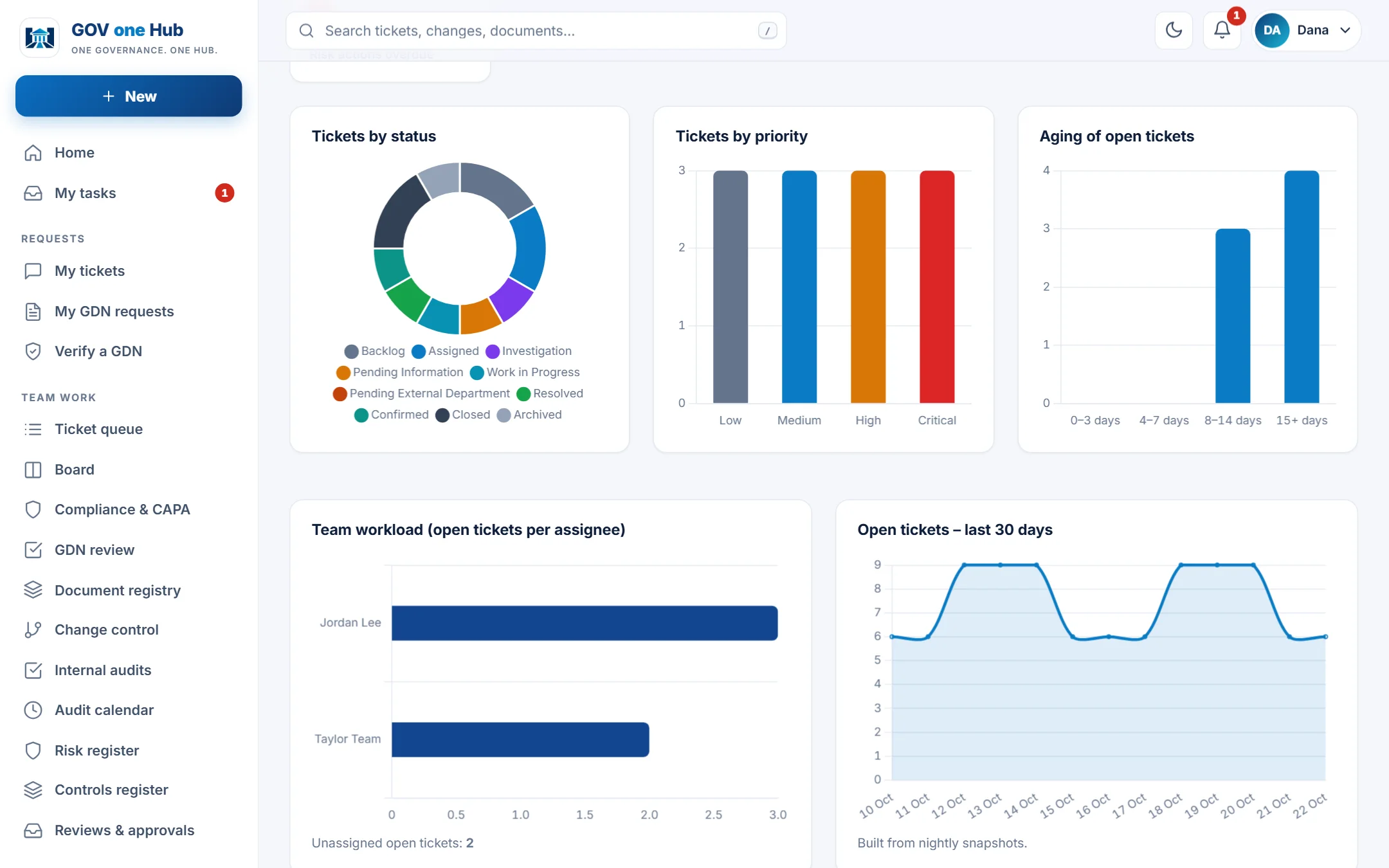
  • Tickets, SLA, workload and ageing at a glance
  • Open changes, CAPA, audits and risks on the same page
  • A by-company view for multi-entity groups
govonehub.com / Operational dashboard
Operational dashboard with ticket status, priority, ageing, workload and trend charts

Drag-and-drop ticket board

Every request has an owner, a status and an SLA clock.

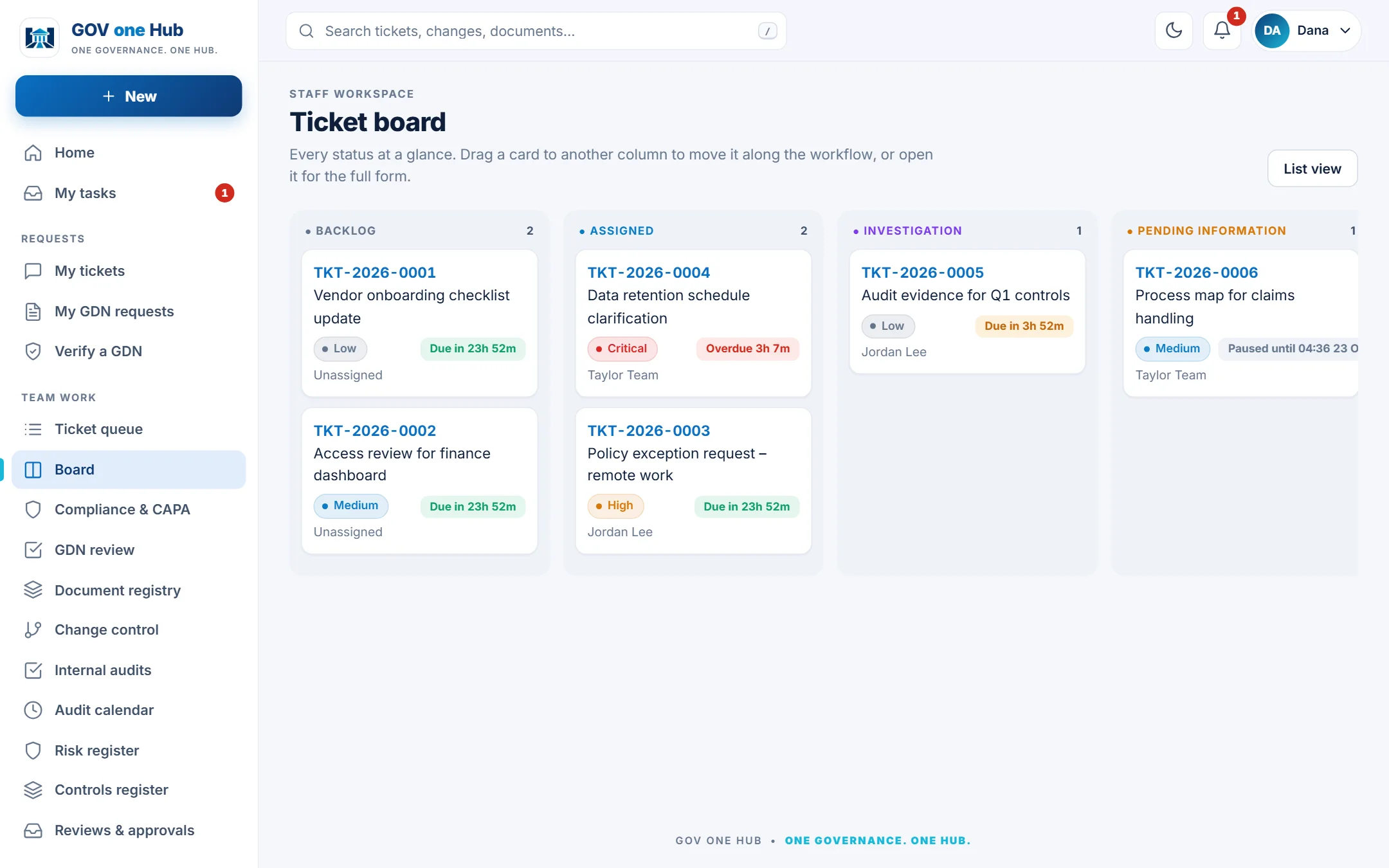
  • Drag a card to move it along the workflow
  • Workflow rules, roles and required fields are enforced
  • SLA chips show who is due, paused or overdue
govonehub.com / Ticket board
Ticket board with columns for each status and SLA chips on every card

Internal audits

Plan audits, record findings and drive each action to verified closure.

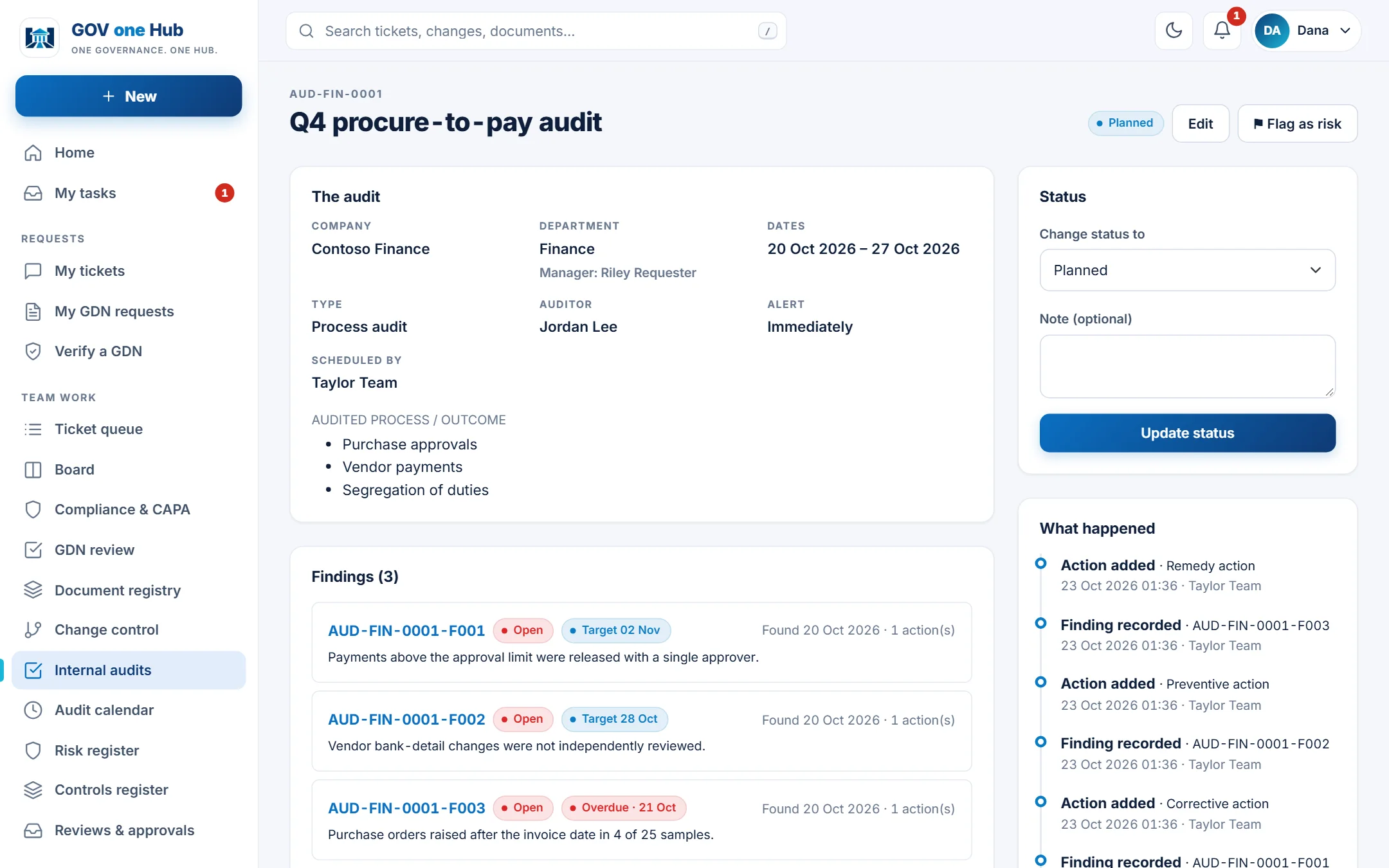
  • Per-department numbering, calendar and list views
  • Findings with target dates and attachments
  • Actions land as tasks with the right department managers
govonehub.com / Internal audits
Internal audit page with audit details, findings and a timeline

Controlled documents

Numbered, versioned, approved and acknowledged.

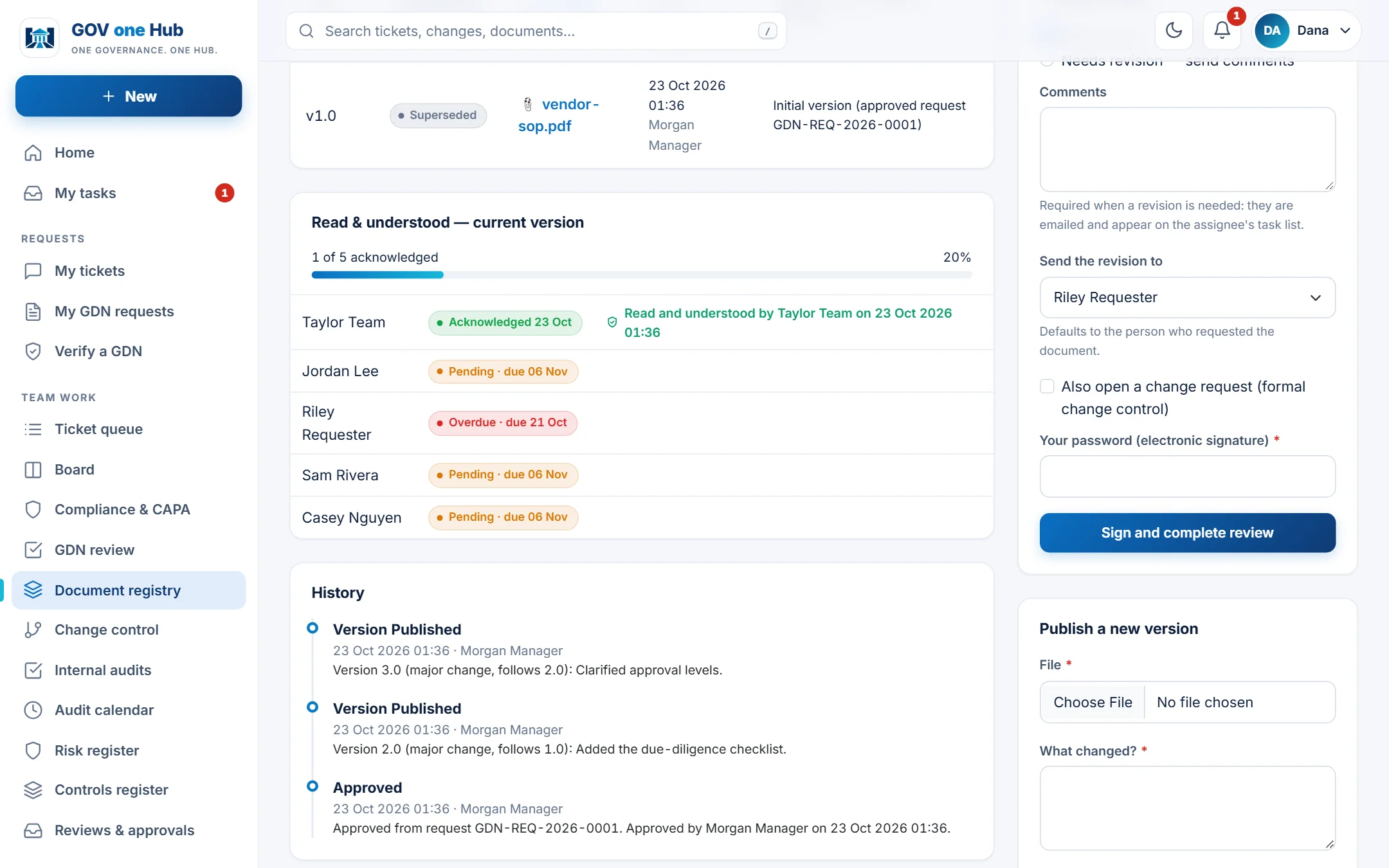
  • Minor and major versions with a full history
  • Read & understood tracked per person with overdue flags
  • Periodic review and electronic signatures
govonehub.com / Document registry
Controlled document page with read and understood tracking and history

Change control

Assess the impact, collect signed approvals and prove it worked.

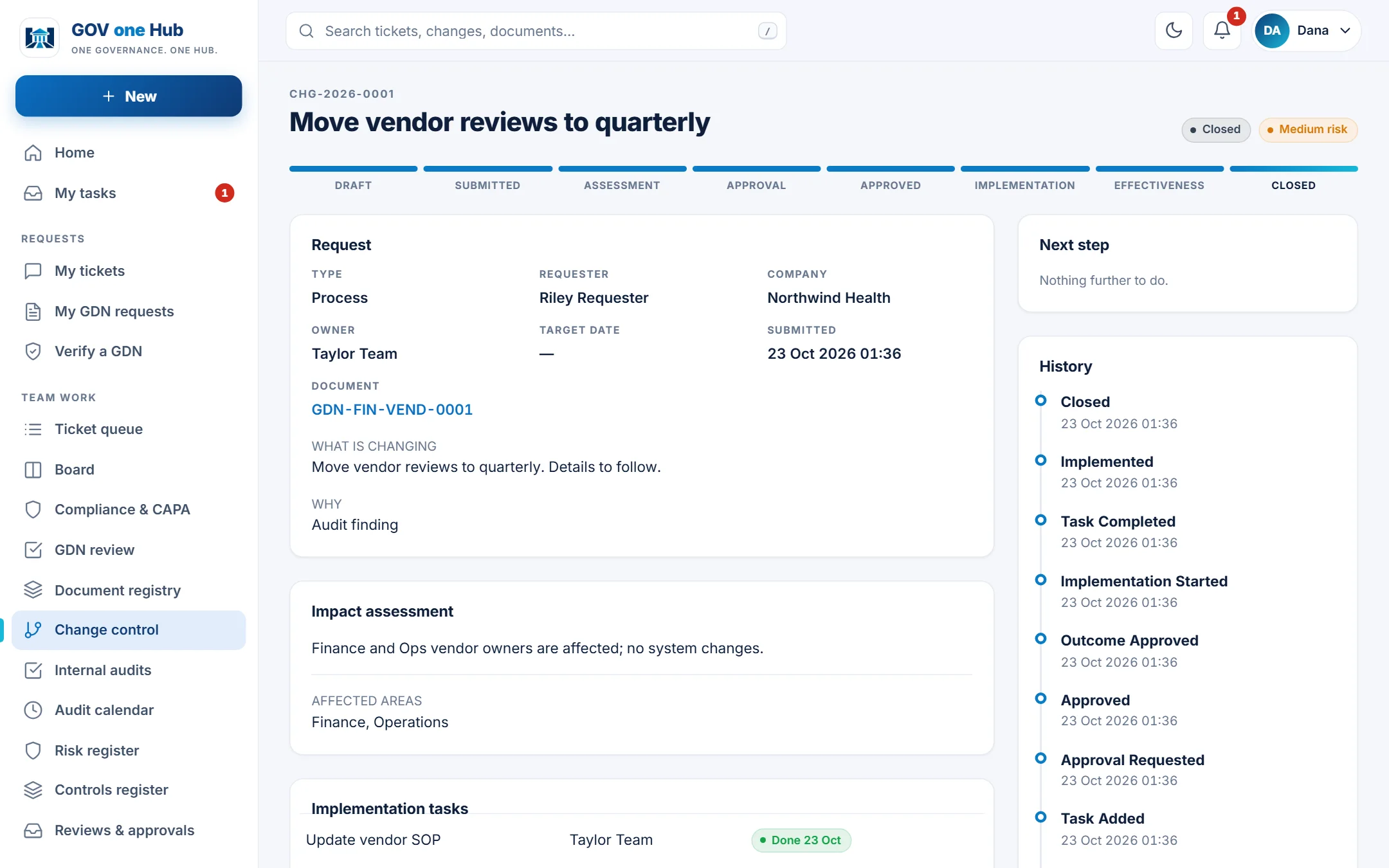
  • Clear eight-step progress from draft to closed
  • Impact assessment and implementation tasks
  • Linked to documents, tickets and companies
govonehub.com / Change control
Change request page with progress steps, impact assessment and history

Enterprise risk

Score, treat, review and report risk across departments and companies.

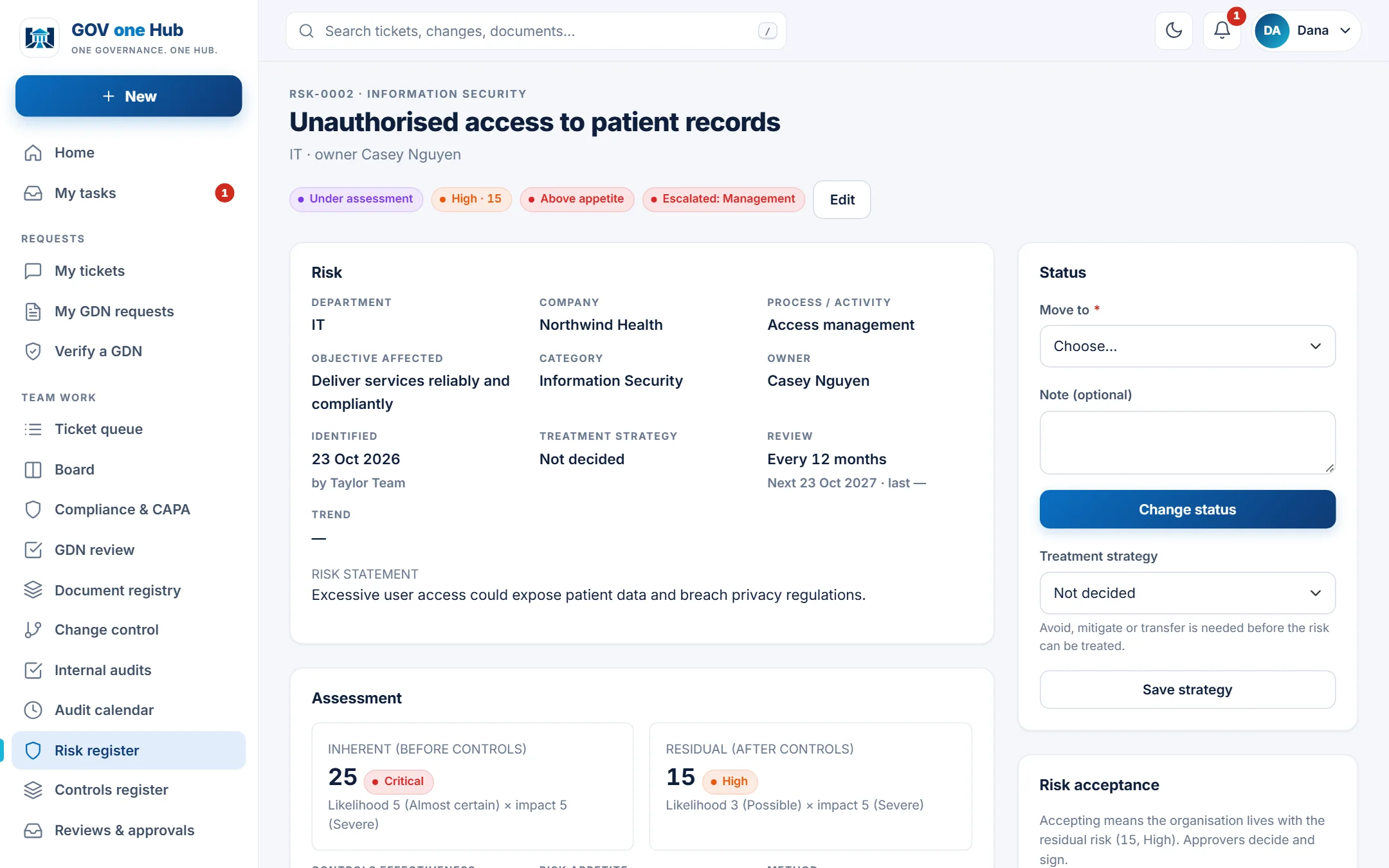
  • Inherent and residual scores against your appetite
  • Escalation, controls, indicators and treatment actions
  • Flag a risk from any ticket, case or finding
govonehub.com / Risk register
Risk page with inherent and residual scores and status badges

Form control

Make the system fit your organisation, with no developer.

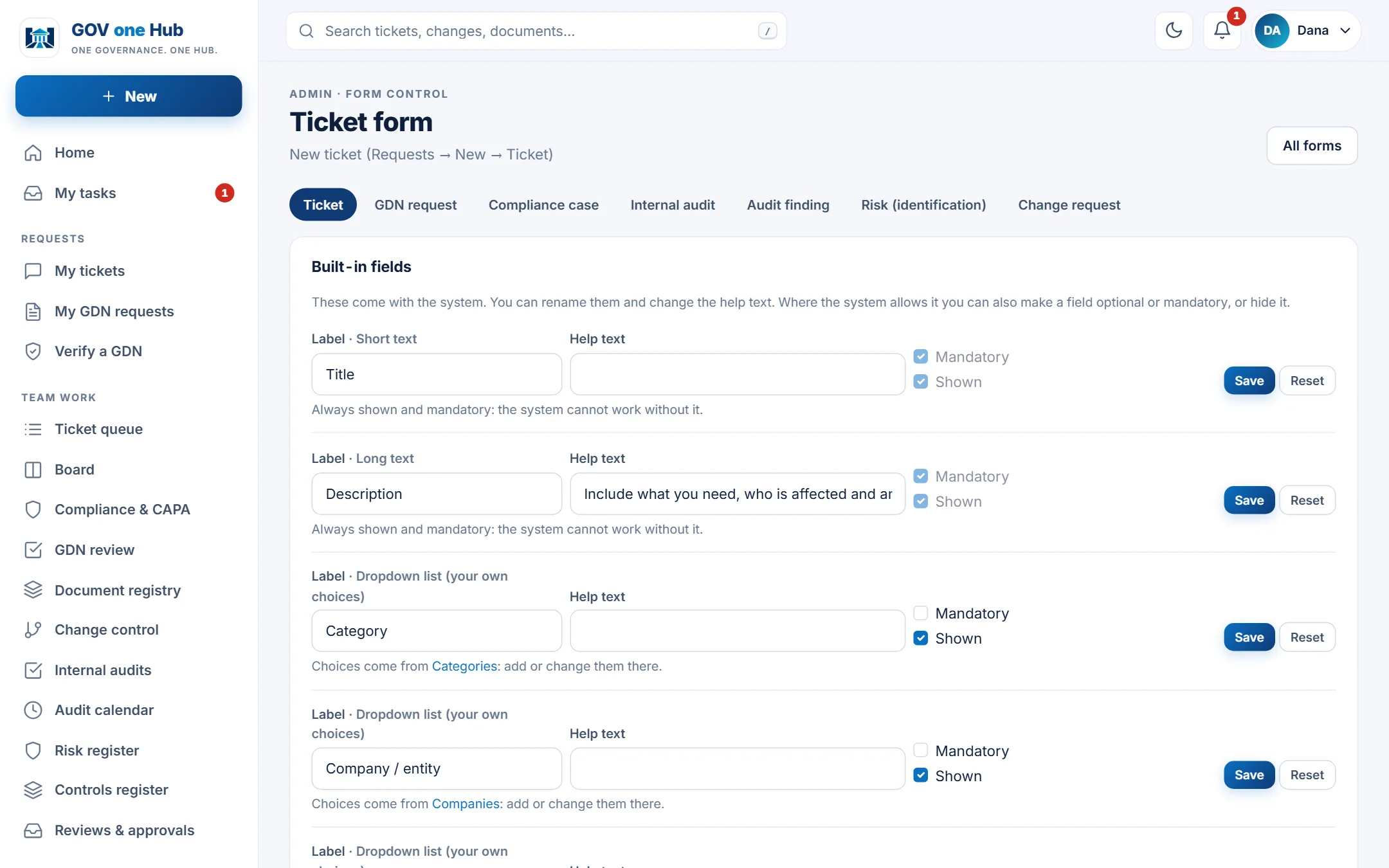
  • Rename, hide or require any field
  • Add dropdowns and related lists, single or multiple choice
  • Mandatory fields flow into the bulk import automatically
govonehub.com / Admin / Form control
Form control screen to rename, hide and require fields
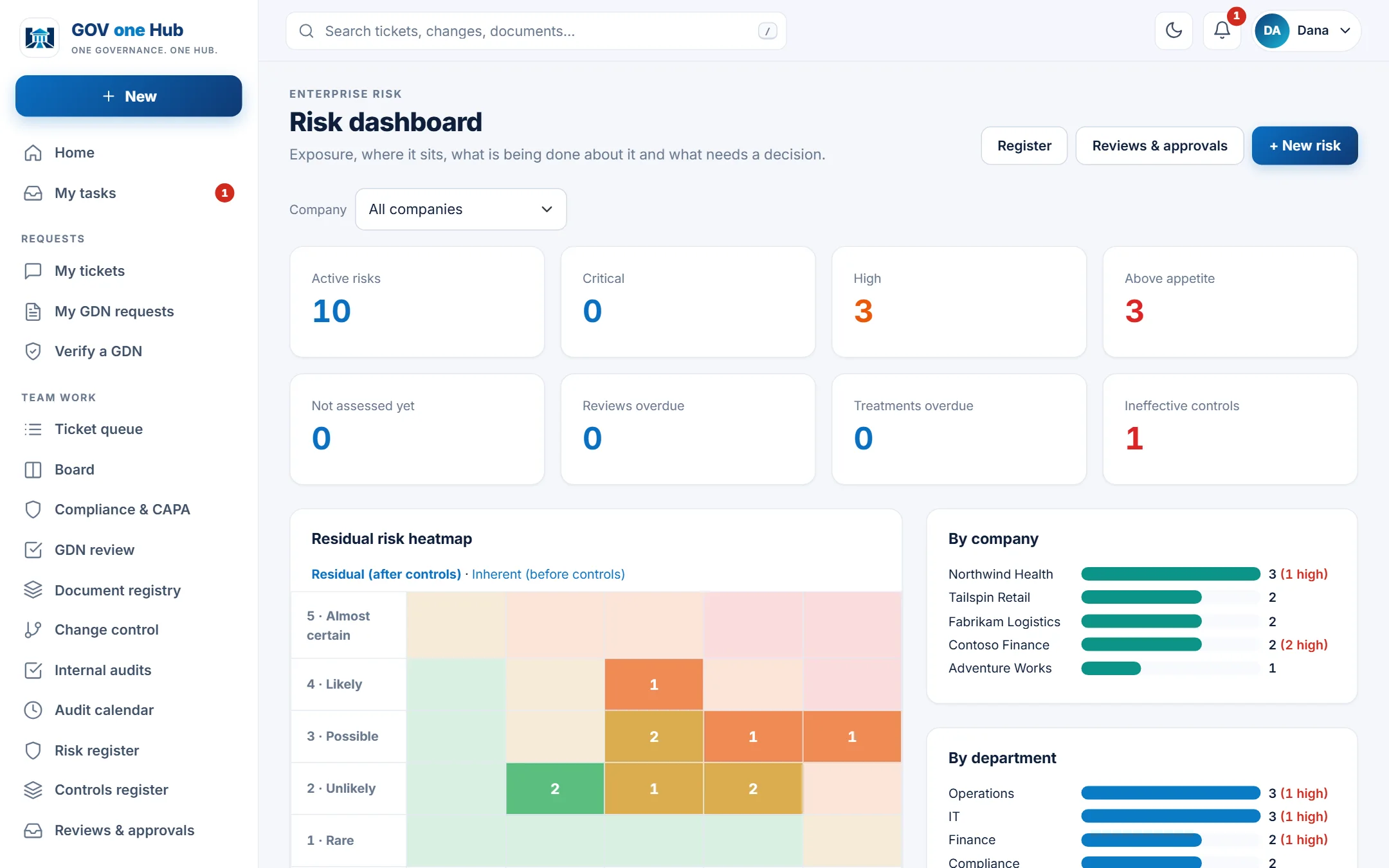
See your risk, not just record it

From scattered findings to a live exposure picture

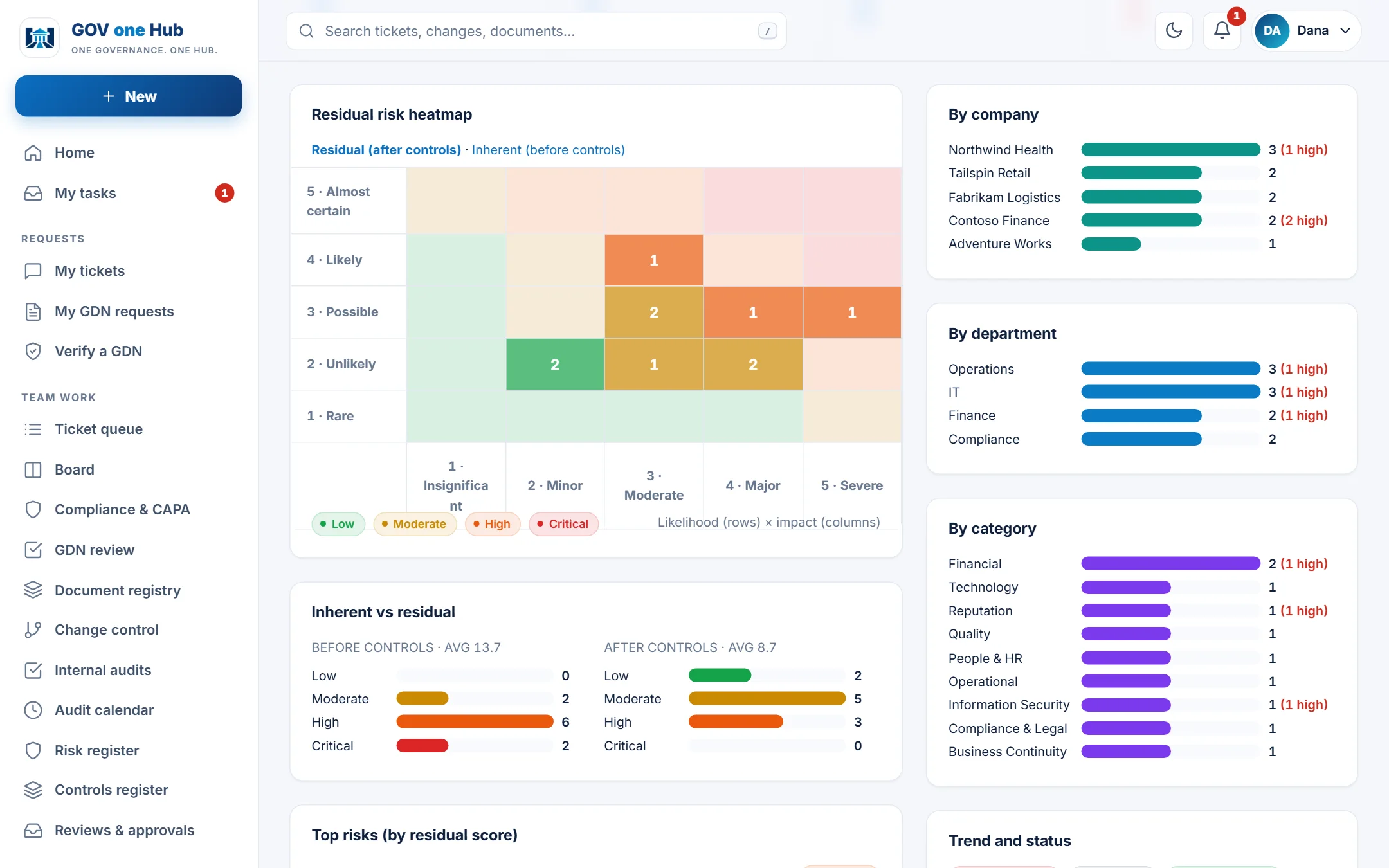
Flag a risk straight from a ticket, compliance case or audit finding. Score it, attach controls, assign treatment actions and watch exposure by department and company update on the dashboard.

  • Inherent vs residual scoringSee what your controls actually achieve against the risk appetite you set.
  • Reviews that happenReview dates, overdue alerts and a clear approval trail for accepting residual risk.
  • Per company, per departmentFilter every figure for one entity, or compare them side by side.
govonehub.com / Risk dashboard
Risk dashboard heatmap with risks by company and department
Audit-ready by design

Prove it. Every action, signed and on the record.

Approvals ask for the approver's password, then record their name, role, time and exactly what they signed. History is append-only, so when the auditor asks "who approved this and when?", the answer is one click away.

  • Electronic signaturesFor document approvals, change decisions, risk acceptance and read & understood.
  • Complete audit logWho changed what, when and from where, searchable and exportable.
  • Nothing falls throughAutomatic emails and tasks for owners, managers and approvers, with overdue reminders.
govonehub.com / Document registry
Controlled document with read and understood tracking and approval history
Built for how organisations really work

Simple for everyone. Flexible for admins.

A clean, modern interface that people use without training, with the controls administrators need to make it fit your organisation.

Roles that make sense

Requesters, governance team, managers and administrators each see exactly what they need. Add custom roles when your structure demands it.

Departments and companies

Department managers get tasks automatically and can delegate within their team. Run several companies or entities in one workspace and report on each.

Your forms, your fields

Rename, hide or require fields, add dropdowns and related lists, with no developer needed. Make a field mandatory and it applies everywhere.

Bring your history

Import historical tickets, cases, documents, audits and risks from Excel or CSV. Check first, import once, undo any batch.

Dashboards and exports

Operational and executive dashboards, a risk dashboard, and CSV, Excel and PDF exports for your management reports.

Email that works for you

Editable email templates and notification rules keep everyone informed without drowning them. Each event is sent once.

How it works

From first call to live, in three steps

No servers to buy, no installation, no long project. We set up your workspace and get your team working.

We set up your workspace

Your branding, departments, companies, roles and users, with your own approval workflows and numbering.

Bring in what you have

Import existing tickets, documents, audits and risks from spreadsheets so history is there from day one.

Your team goes live

People sign in, see their tasks and start working. Managers watch dashboards update in real time.

Security & control

Your governance data deserves serious protection

Security is part of how the product is built, not an add-on.

Access control

Role-based permissions, password lockout after repeated failures and optional two-factor authentication.

Signed approvals

Re-authenticated e-signatures with a tamper-evident record of who signed what and when.

Backups

Automatic nightly backups of the database and uploaded files, with retention you control.

Hardened web app

Strict content security policy, protected uploads and private storage that is never exposed to the web.

Pricing

Simple plans that grow with you

Pick the size that fits, with every module available. Tell us about your organisation and we will send a clear quote.

Starter

For small teams getting organised
Contact us
  • Tickets with SLA
  • Controlled documents
  • Compliance & CAPA
  • Standard dashboards
  • Email support
Get a quote
Most popular

Business

For growing governance and quality teams
Contact us
  • Everything in Starter
  • Change control and internal audits
  • Enterprise risk register
  • Form control and bulk import
  • Guided onboarding
Book a demo

Enterprise

For multi-entity organisations
Contact us
  • Everything in Business
  • Multiple companies and departments
  • Custom roles and approval flows
  • Data migration support
  • Priority support
Talk to us

Plans, limits and prices are tailored to your organisation. Ask about annual terms and onboarding.

Questions

Answers before you ask

Do we need to install anything?

No. GOV one Hub runs in the browser on desktop, tablet and phone. We host and maintain it, and your team signs in with their own accounts.

How long does it take to get started?

Most organisations are working in days. We configure departments, roles and forms with you, and you can import your existing history from Excel or CSV.

Can we use only some of the modules?

Yes. Start with tickets or documents, and turn on change control, audits and risk when you are ready. They all share the same data, so nothing has to be re-entered.

Can it match our own process and wording?

Yes. Administrators can rename fields, make them mandatory or optional, add dropdown and related-list fields, edit email templates and set approval and SLA rules without writing code.

We have several companies. Can we separate them?

Yes. Records can carry a company, and the lists and dashboards can be filtered or compared per company. Departments and their managers work the same way.

Is our data safe?

Access is role-based, sensitive actions are e-signed and logged, uploads are stored privately and backups run every night. Ask us for the details and we will walk you through them.

Can we bring in our existing records?

Yes. The bulk import loads historical tickets, compliance cases, documents, changes, audits, findings and risks. It checks the file first, keeps original dates, sends no emails and can be undone per batch.

See GOV one Hub run your governance, live

Book a short demo and we will show you the workflow that matters most to your team, using your own scenarios.